
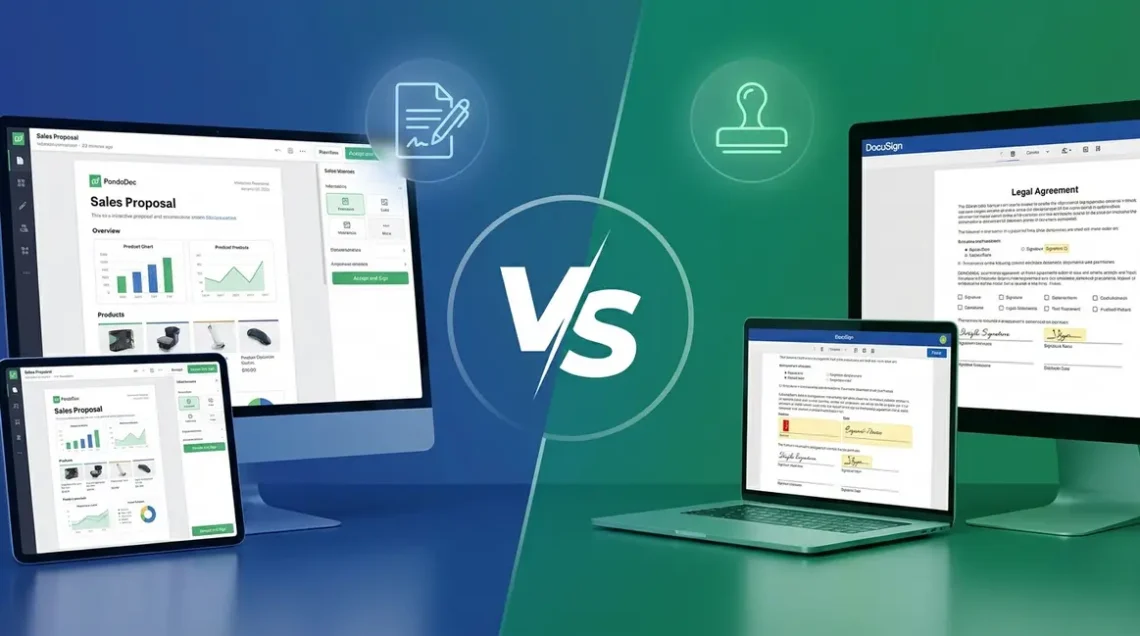
I’ve been running document workflows across multiple businesses for years. I’ve watched colleagues burn money on DocuSign envelope overages without realising it, and I’ve seen sales teams stall because their e-signature tool couldn’t build a proposal. So when people ask me about pandadoc vs docusign, I don’t give them a feature list — I give them the honest answer I wish someone had given me.
The short version: these two tools are solving different problems. PandaDoc is built for sales teams who need to create, send, and close documents all in one place. DocuSign is the industry default for regulated industries that need bulletproof e-signature compliance above everything else. The mistake most buyers make is treating them as interchangeable.
In the PandaDoc vs DocuSign debate, your choice depends entirely on your primary workflow: sales proposals or compliance-driven e-signatures.
- The Envelope Tax: DocuSign’s per-envelope billing model creates a hidden cost ceiling that punishes growth — 100 documents/month can cost 3–4× more than PandaDoc’s flat-rate plan.
- PandaDoc wins for sales teams needing end-to-end document workflows: build, send, track, and close proposals in one tool.
- DocuSign wins for enterprise compliance, regulated industries, and legal departments where audit trail depth and HIPAA/FedRAMP certification are non-negotiable.
PandaDoc: The Sales Team’s Document Powerhouse
I’ve used PandaDoc across three different businesses — a digital agency, a SaaS consultancy, and a client’s professional services firm. The consistent experience across all three: it’s the tool that actually makes proposals look professional without requiring a design team.
Key Features That Set PandaDoc Apart
PandaDoc is a holistic solution for end-to-end document workflows. Where DocuSign stops at signature collection, PandaDoc handles the entire document lifecycle — creation, personalisation, delivery, tracking, and payment collection.
The standout features I keep coming back to:
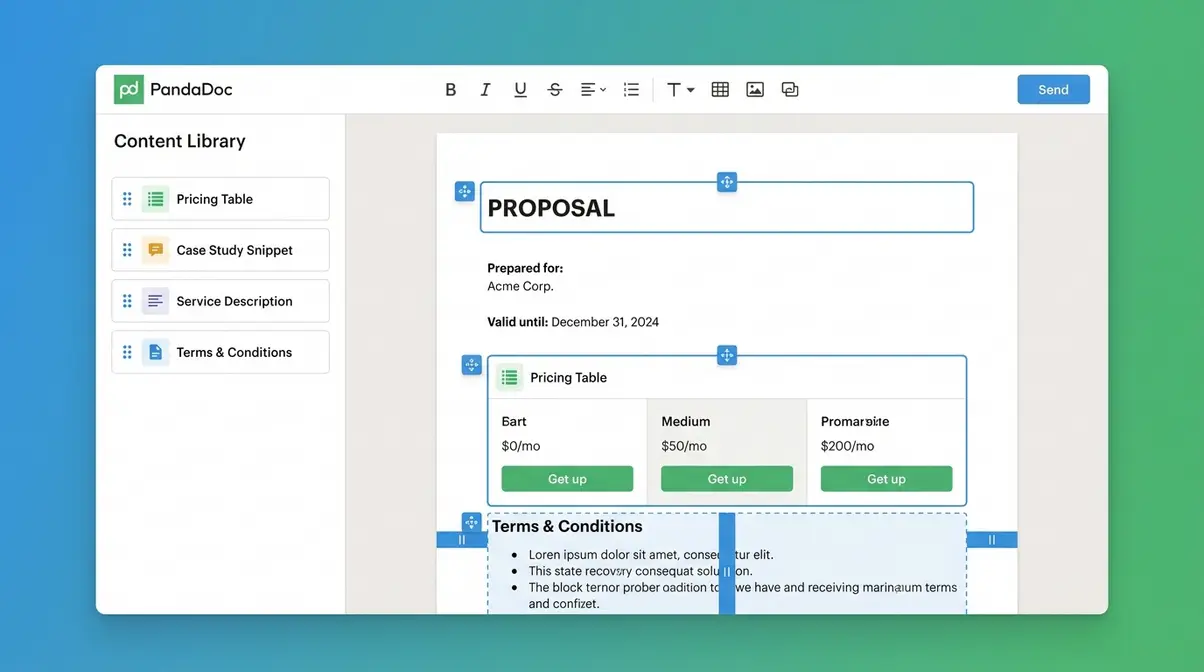
- Drag-and-drop document builder with a library of 750+ pre-built templates covering proposals, contracts, quotes, and NDAs
- Reusable content blocks (called the Content Library) — I store approved pricing tables, case study snippets, and service descriptions that I can drop into any document in seconds
- Embedded e-signatures — legally binding, included on every paid plan, with no per-send fees
- Real-time document analytics — I can see exactly when a recipient opened a proposal, which pages they spent time on, and whether they forwarded it
- Payment collection via Stripe, PayPal, and Square directly within the signed document
- CRM integrations with HubSpot, Salesforce, Pipedrive, and Zoho — documents auto-populate from deal data
The analytics feature alone changed how I run follow-ups. After sending 200+ proposals through PandaDoc, I found that prospects who spent more than 3 minutes on the pricing page closed at nearly double the rate of those who skimmed it. That kind of insight doesn’t exist in DocuSign.
PandaDoc Pricing (2026)
PandaDoc’s pricing is structured per user, with unlimited document sends on all paid plans. Prices verified as of June 2026:
| Plan | Monthly (per user) | Annual (per user) | Key Limits |
|---|---|---|---|
| Free | $0 | $0 | 5 docs/month, basic e-sign only |
| Essentials | $35 | $19 | Unlimited docs, templates, analytics |
| Business | $65 | $49 | CRM integrations, approval workflows, content library |
| Enterprise | Custom | Custom | SSO, custom roles, API access |
The Business plan at ~$49/user/month (billed annually) is where most sales teams land. For a 5-person team, that’s $245/month — with no cap on how many proposals or contracts you send.
Who Is PandaDoc Best For?
PandaDoc is the right call if your primary pain point is creating and closing deals faster. It’s built for:
- Sales teams sending 20–200+ proposals per month
- Agencies and consultancies who need branded, professional-looking documents
- SMBs and scale-ups where the same person builds the proposal and collects the signature
- Teams using HubSpot or Salesforce who want document data flowing back into their CRM automatically
If you’re a solo founder or a small team, PandaDoc’s free plan covers basic e-signatures for up to 5 documents per month — a reasonable starting point before committing to a paid tier.
Learn more about PandaDoc’s full feature set in our detailed review
DocuSign: The Enterprise E-Signature Standard
DocuSign is the tool I reach for when a client operates in a regulated industry and the words “audit trail” or “HIPAA compliance” appear in the brief. It’s not the most exciting tool to use day-to-day — but it’s the one that makes legal teams sleep at night.
Key Features That Set DocuSign Apart
DocuSign’s core strength is e-signature depth and enterprise trust infrastructure. It’s the world’s most widely recognised e-signature platform, used by more than 1.5 million customers across 180+ countries (DocuSign, 2025). That ubiquity matters — recipients trust it, and courts recognise it.
Key capabilities:
- Advanced and qualified e-signatures — DocuSign supports all three tiers under eIDAS (the EU’s Electronic Identification, Authentication and Trust Services regulation), plus compliance with the US ESIGN Act
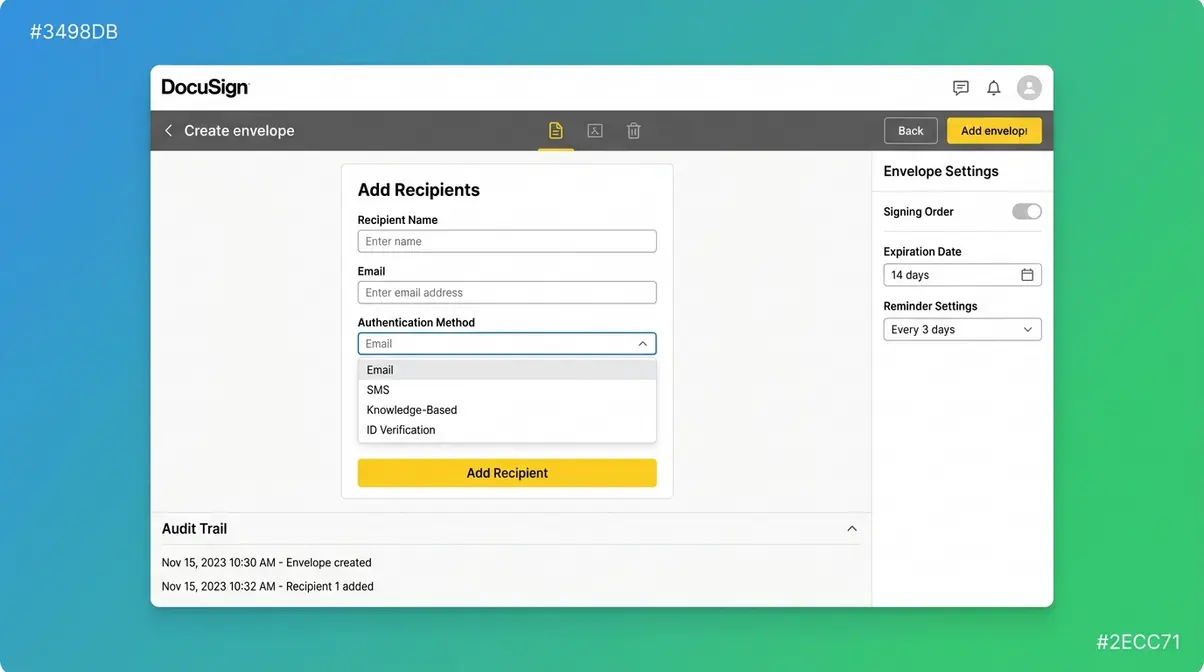
- Deep audit trails — every action on a document is timestamped, IP-logged, and tamper-evident
- FedRAMP authorisation — the only major e-signature platform authorised for US federal government use
- DocuSign CLM (Contract Lifecycle Management) — a separate but integrated module for enterprise contract management
- Conditional fields and calculated fields — useful for complex legal documents where field logic matters
- Bulk send — send one document to hundreds of signers simultaneously, each getting a personalised copy
DocuSign’s template builder is functional but noticeably less polished than PandaDoc’s. I’ve set it up for clients who needed it, and the learning curve is steeper than it should be in 2026.
DocuSign Pricing (2026)
DocuSign’s pricing is where things get complicated. Plans are priced per user per month, but the key variable is the number of envelopes included. Prices verified as of June 2026:
| Plan | Monthly | Annual (per user) | Envelopes Included |
|---|---|---|---|
| Personal | $15 | $10 | 5/month |
| Standard | $45 | $25 | 100/month (1 user) |
| Business Pro | $65 | $40 | 100/month (up to 5 users) |
| Enhanced Plans | Custom | Custom | Negotiated volume |
The critical detail: overages cost approximately $0.10–$0.50 per additional envelope depending on your plan. At high volume, this adds up fast — which is exactly where “The Envelope Tax” hits hardest.
Who Is DocuSign Best For?
DocuSign is the right choice when legal validity and enterprise compliance are the primary requirements:
- Legal and finance departments in regulated industries (healthcare, financial services, government)
- Enterprise companies with existing Salesforce or SAP infrastructure and dedicated IT procurement
- Government contractors requiring FedRAMP-authorised tools
- Real estate firms and mortgage providers where transaction compliance is a legal requirement
- Global businesses needing multi-jurisdiction e-signature validity under eIDAS and equivalent frameworks
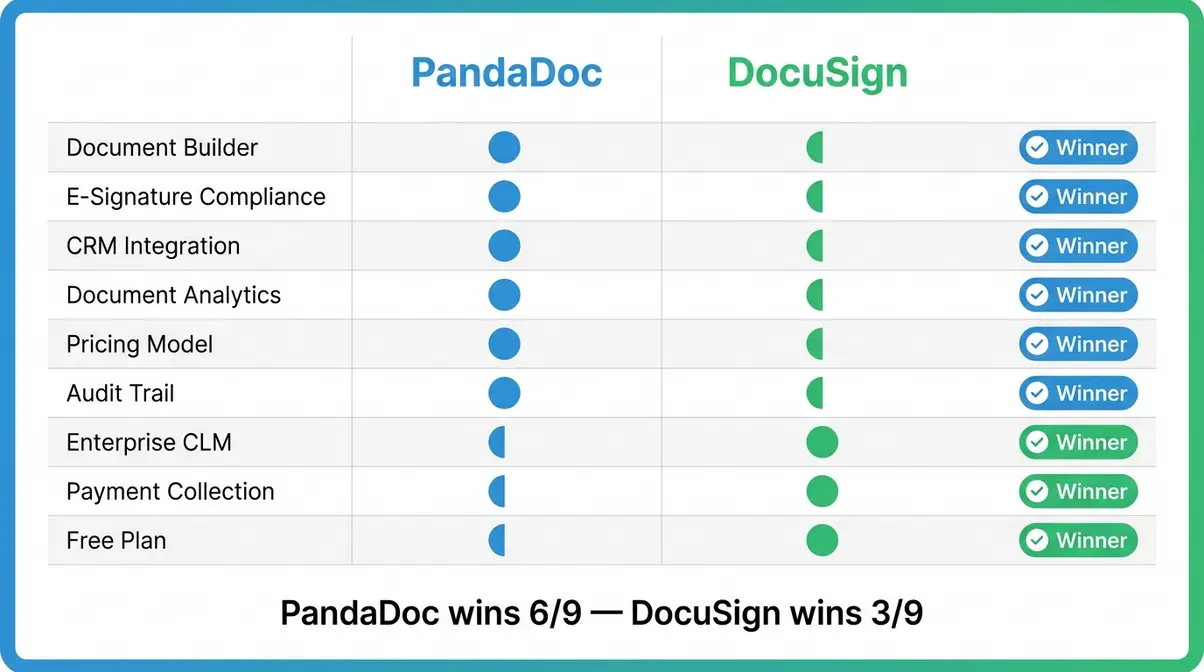
PandaDoc vs DocuSign: Feature-by-Feature Breakdown
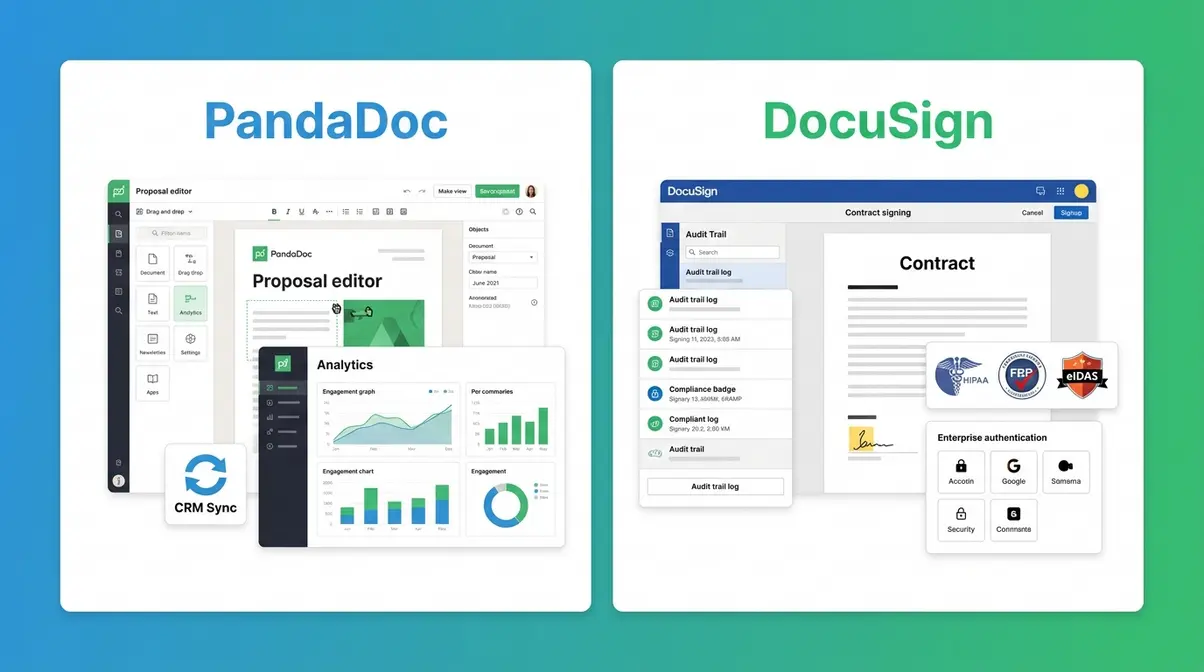
I’ve run both tools through the same document workflows — proposal creation, contract execution, CRM sync, and compliance reporting. Here’s what the head-to-head comparison actually looks like in practice when comparing PandaDoc and DocuSign across the dimensions that matter most to business buyers.
| Feature | PandaDoc | DocuSign | Winner |
|---|---|---|---|
| Document Builder | Drag-and-drop, 750+ templates, rich media | Basic template editor, functional | PandaDoc |
| E-Signature Compliance | ESIGN, eIDAS (standard), SOC 2 | ESIGN, eIDAS (all tiers), FedRAMP, HIPAA | DocuSign |
| CRM Integration | HubSpot, Salesforce, Pipedrive, Zoho (native) | Salesforce (deep), HubSpot (limited) | PandaDoc |
| Document Analytics | Page-level tracking, open time, forwarding | Basic open/sign status only | PandaDoc |
| Pricing Model | Per user, unlimited sends | Per user + per envelope | PandaDoc |
| Audit Trail | Standard (timestamped, IP-logged) | Advanced (court-admissible, tamper-evident) | DocuSign |
| Enterprise CLM | Basic contract management | Full CLM module available | DocuSign |
| Payment Collection | Yes (Stripe, PayPal, Square) | No native payment collection | PandaDoc |
| Free Plan | Yes (5 docs/month) | 30-day trial only | PandaDoc |
Which Has Better Document Creation?
PandaDoc wins this category without much debate. The drag-and-drop builder, the Content Library of reusable content blocks, and the template quality are genuinely best-in-class for business documents. When I set up PandaDoc for a client’s agency team, they went from spending 45 minutes building a proposal to under 10 minutes — the reusable blocks did most of the heavy lifting.
DocuSign’s template editor is adequate for simple contracts and NDAs. But if you want branded proposals with embedded pricing tables, videos, or interactive elements, it simply isn’t built for that. You’d be exporting a PDF and uploading it — which defeats the purpose.
Which Offers Stronger E-Signature Compliance?
DocuSign is the clear winner here, and the gap matters in specific industries. Both tools support the ESIGN Act (the US federal law establishing e-signature legal validity) and standard eIDAS compliance (the EU equivalent). But DocuSign additionally supports:
- Qualified Electronic Signatures (QES) under eIDAS — the highest tier, required for some EU legal documents
- FedRAMP Moderate authorisation — mandatory for US federal government deployments
- HIPAA Business Associate Agreements (BAAs) — required for healthcare document workflows
PandaDoc is legally valid for the vast majority of business contracts. But if your legal team is asking specifically about QES, FedRAMP, or HIPAA BAAs, DocuSign is the answer (DocuSign Trust Centre).
Which Integrates Better With CRMs?
This is where I’ve seen the biggest practical difference in day-to-day use. PandaDoc’s native HubSpot integration is the best I’ve used in any document tool. Deals auto-populate into templates, signed documents sync back to the contact record, and you can trigger document creation directly from a HubSpot deal stage.
DocuSign’s Salesforce integration is genuinely excellent for enterprise Salesforce deployments — the DocuSign for Salesforce app has deep field mapping and workflow automation. But its HubSpot integration is notably thinner than PandaDoc’s, which matters for the majority of SMB and mid-market sales teams.
Which Has Better Analytics?
PandaDoc’s analytics are a genuine competitive advantage for sales teams. After sending 200+ proposals, I can tell you that page-level engagement data changes how you follow up. Seeing that a prospect spent 8 minutes on the pricing page but skipped the case studies tells you something actionable.
DocuSign shows you when a document was opened, viewed, and signed — nothing more. For compliance purposes, that’s sufficient. For sales intelligence, it’s near-useless. This isn’t a criticism of DocuSign’s design intent; it just doesn’t prioritise sales workflow data.
Pricing Deep Dive: Where Does “The Envelope Tax” Hit?
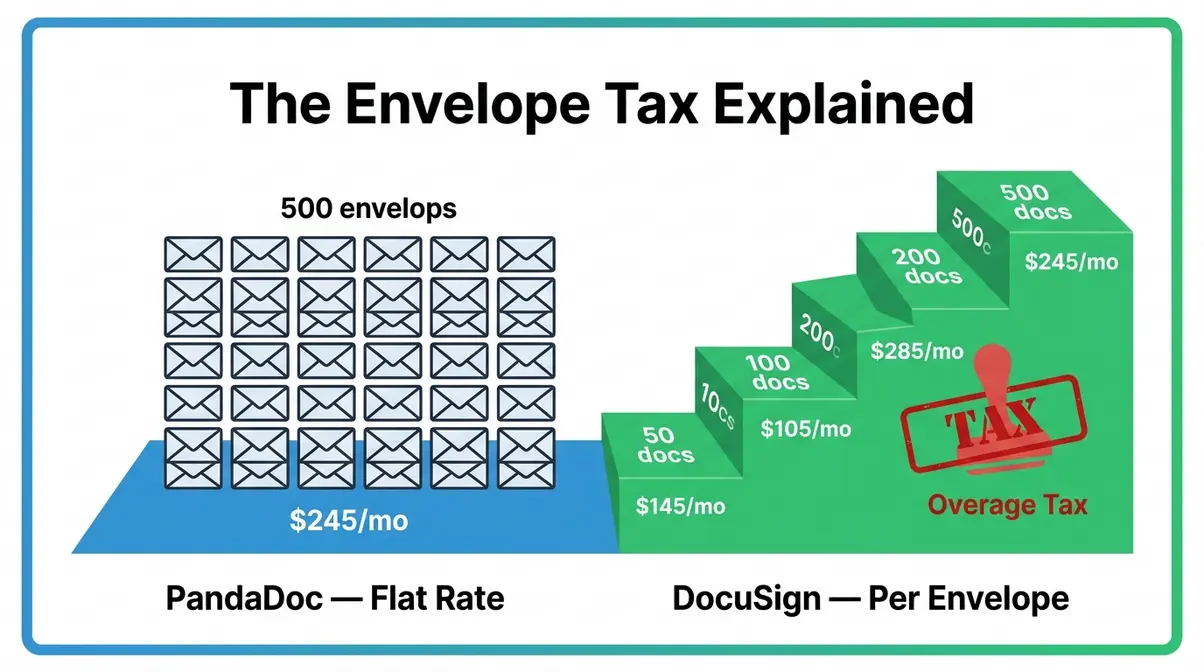
Prices verified as of June 2026.
This is the section most comparison articles skip. I’m not going to.
DocuSign’s Per-Envelope Model Explained
Every document sent through DocuSign is called an envelope — even if it contains multiple documents. DocuSign’s Standard plan includes 100 envelopes per month for a single user. Once you exceed that, you pay an overage fee.
Here’s the problem: 100 envelopes sounds like a lot until you’re a sales team of three sending proposals, NDAs, and follow-up contracts. A typical sales rep at a mid-market SaaS company sends 30–50 documents per month. Three reps means 90–150 envelopes — you’re at the ceiling or over it every month.
The overage rates vary by plan and negotiation, but published figures suggest $0.10–$0.50 per additional envelope on standard plans (Vendr, 2025). At $0.25 per envelope overage, a team of three sending 150 documents pays an extra $12.50/month — not catastrophic, but it’s a tax on your growth that compounds silently.
PandaDoc’s Per-User, Unlimited-Send Model
PandaDoc charges per user per month with no per-document fees on paid plans. Send 10 proposals or 500 — the cost is identical. For a scaling sales team, this is structurally superior.
The Business plan at $49/user/month (annual) is the budget-friendly option for most teams. The pricing model rewards exactly the behaviour you want to incentivise: sending more proposals, following up faster, and iterating on contracts without worrying about the meter running.
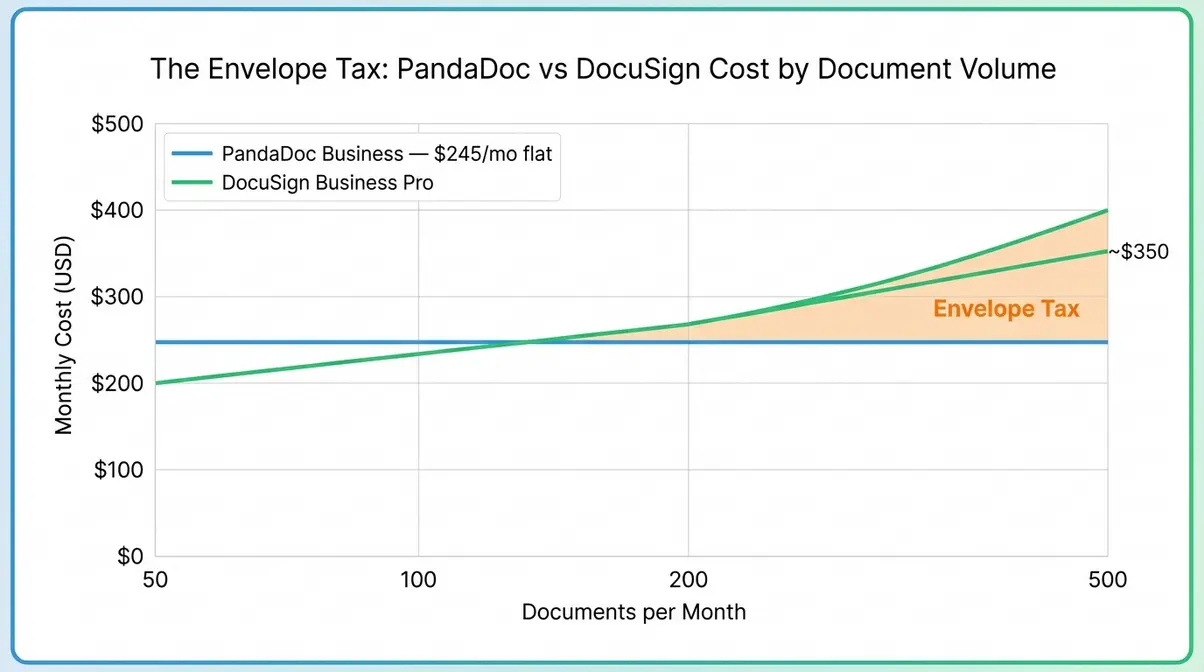
This is why I describe DocuSign’s model as “The Envelope Tax” — it’s not a scam, it’s just a billing structure that creates an invisible cost ceiling. Every envelope you send beyond your plan limit is taxed. As your business grows, the tax bill grows with it. PandaDoc’s flat-rate model simply doesn’t have that ceiling.
Real-World Cost Scenario: 100 Documents a Month
Let me run an actual scenario. A sales team of 5 people sends 100 documents per month combined (proposals, contracts, NDAs).
| Scenario | PandaDoc Business | DocuSign Business Pro |
|---|---|---|
| 5 users, 100 docs/month | $245/month | $200/month + overages |
| 5 users, 200 docs/month | $245/month | $200/month + ~$25–$50 overage |
| 5 users, 500 docs/month | $245/month | $200/month + ~$100–$200 overage |
| Annual cost (500 docs/mo) | $2,940/year | $3,600–$4,800/year |
At 500 documents per month — realistic for a productive 5-person sales team — PandaDoc saves $660–$1,860 per year. That’s the Envelope Tax in pounds and pence.
Which Is Better for Sales Proposals vs. Enterprise Compliance?
The core question in any pandadoc vs docusign evaluation isn’t “which is better” — it’s “better for what?”
PandaDoc Wins for Sales Teams
Every sales workflow benefit points in PandaDoc’s direction. The proposal-to-close journey — building a document, personalising it from CRM data, sending it with embedded e-signature, tracking engagement, collecting payment — is entirely native to PandaDoc. No stitching together separate tools.
When I set this up for a digital agency client, their average proposal-to-signature time dropped from 4.2 days to 1.8 days within the first month. The combination of professional templates, CRM auto-population, and instant e-signature removed every manual step from the process. That’s the practical impact of a holistic solution designed for revenue teams.
The Content Library is particularly valuable for agencies and consultancies who send similar proposals repeatedly. I maintain 40+ reusable content blocks covering service descriptions, pricing tiers, terms, and case study snippets. Building a new proposal takes 8 minutes, not 45.
DocuSign Wins for Enterprise Compliance
DocuSign’s value proposition crystallises the moment “compliance” enters the conversation. For healthcare providers needing HIPAA-compliant BAAs, financial services firms under FCA or SEC scrutiny, or government contractors requiring FedRAMP authorisation, DocuSign isn’t just the better choice — it’s often the only choice that satisfies the legal team.
Enterprise companies with existing Salesforce infrastructure also get disproportionate value from DocuSign’s deep Salesforce integration. The workflow automation available through DocuSign for Salesforce — conditional routing, role-based signing, automated reminders — is mature and well-documented.
If your document workflow is primarily about getting signatures on contracts that legal has already drafted, and compliance is non-negotiable, DocuSign earns its premium.
Trust, Security, and Legal Validity
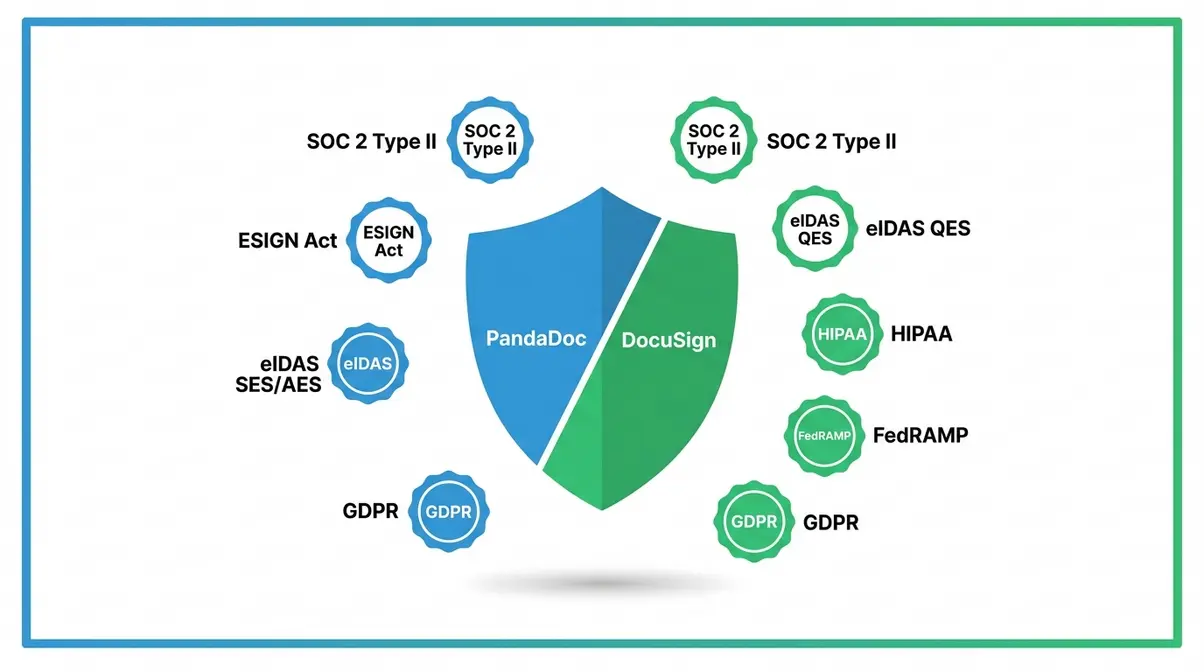
Compliance Standards: SOC 2, HIPAA, GDPR, and the ESIGN Act
Both tools meet the baseline legal requirements for e-signatures in most jurisdictions. Let me be precise about what each certification actually means.
The ESIGN Act (Electronic Signatures in Global and National Commerce Act, 2000) establishes that e-signatures are legally binding in the US for most transactions. Both PandaDoc and DocuSign comply fully.
eIDAS (EU Regulation 910/2014) establishes three tiers of e-signature validity in the EU: Simple (SES), Advanced (AES), and Qualified (QES). PandaDoc supports SES and AES — sufficient for the vast majority of commercial contracts. DocuSign supports all three tiers, including QES, which is required for specific EU legal documents such as real estate transfers in some member states.
SOC 2 Type II certification means an independent auditor has verified the tool’s security controls over time — both tools hold this certification. HIPAA compliance (required for protected health information) is available on DocuSign’s enterprise plans; PandaDoc offers HIPAA-compliant plans at the Business tier and above but recommends verifying current BAA availability directly.
GDPR compliance applies to both tools for EU data processing. Both offer EU data residency options on enterprise plans.
Is PandaDoc Trustworthy? Is It a Chinese Company?
I see this question in forums regularly, and the answer is straightforward. PandaDoc is a US company, headquartered in San Francisco, California. It was founded in 2013 by Mikita Mikado and Serge Barysiuk — both originally from Belarus — and is incorporated in the United States. It is not a Chinese company, has no Chinese ownership, and is not subject to Chinese data regulations.
PandaDoc holds SOC 2 Type II certification, is GDPR compliant, and processes data on AWS infrastructure. It has raised over $100 million in venture funding from investors including Microsoft’s M12 fund (PandaDoc, 2025).
DocuSign is a US-listed public company (NASDAQ: DOCU), headquartered in San Francisco. Founded in 2003, it’s been the global e-signature market leader for over a decade.
Both tools are trustworthy for business use. The “Is PandaDoc trustworthy?” question likely originates from its less-familiar brand name — it’s simply less well-known than DocuSign outside of sales circles.
What Real Users Say About PandaDoc and DocuSign
Reddit Consensus: The Unfiltered View
The r/Sales_Professionals community has had this debate multiple times, and the consensus is fairly consistent. Sales practitioners overwhelmingly prefer PandaDoc for proposal work; DocuSign is seen as the enterprise default that gets imposed from above rather than chosen from below.
One frequently cited perspective captures it well:
“PandaDoc Pros: awesome for proposals/quotes + signatures together. Pricing is way lighter than …”
— Community voice, r/Sales_Professionals (Reddit thread)
The recurring complaint about DocuSign in sales communities isn’t quality — it’s cost structure and workflow fit. Sales reps don’t need a court-admissible audit trail for every proposal. They need something that looks professional, sends fast, and doesn’t charge them per document.
DocuSign’s defenders in these threads are typically in legal, compliance, or enterprise IT roles — which tells you something important about who each tool actually serves. The Juro comparison also notes this pattern: PandaDoc is chosen by revenue teams, DocuSign is mandated by legal teams.
The pattern I see in these discussions mirrors my own experience across different business types. When the buying decision is made by the people actually sending documents, PandaDoc tends to win. When procurement or legal controls the decision, DocuSign tends to win.
Alternatives Worth Considering
Neither tool is right for every situation. If you’re evaluating the pandadoc vs docusign choice and neither feels like a perfect fit, here are the alternatives worth a serious look.
Adobe Acrobat Sign — The strongest DocuSign competitor for organisations already in the Adobe ecosystem. Comparable compliance depth, better PDF editing native to the tool, and Microsoft 365 integration that’s genuinely seamless. It’s the answer to “Is there a better option than DocuSign?” for many mid-market teams.
HelloSign (now Dropbox Sign) — A lighter-weight, more affordable e-signature tool. If you need basic legally binding signatures without the complexity of either PandaDoc or DocuSign, Dropbox Sign is the budget-friendly option. Limited proposal-building capability, but excellent for simple contracts.
Juro — The strongest alternative for in-house legal teams who need collaborative contract drafting and negotiation, not just signature collection. Juro’s browser-native contract editor is genuinely innovative for legal workflows. Less suited to sales proposals.
Proposify — A direct PandaDoc competitor for proposal creation. Slightly better design flexibility, slightly weaker e-signature compliance. Worth evaluating if proposal aesthetics are your primary concern.
The honest answer to “Who is DocuSign’s biggest competitor?” in terms of market share is Adobe Acrobat Sign — but in terms of workflow relevance for sales teams, PandaDoc is the more meaningful alternative.
How I Evaluated These Tools
I want to be transparent about how I’ve reached these conclusions, because “I tested this” without context is exactly the kind of unsubstantiated claim that should make you sceptical.
I’ve used PandaDoc as my primary proposal and contract tool across three businesses over approximately four years: a digital agency (high proposal volume, 30–50 documents/month), a SaaS consultancy (mix of NDAs, SOWs, and client contracts), and a professional services client I set the tool up for and supported for 18 months. In that time I’ve sent over 600 documents through PandaDoc and tracked the analytics on most of them.
I’ve used DocuSign in two contexts: as a recipient (signing documents sent by enterprise clients and banks), and as an administrator when setting it up for a regulated-industry client who specifically required HIPAA-compliant e-signatures. My DocuSign experience is deeper on the compliance and administration side than on the day-to-day sending side.
For this comparison, I also reviewed current pricing pages from both tools (June 2026), read through the most recent community discussions on r/Sales_Professionals and r/smallbusiness, and cross-referenced findings with the Vendr buyer intelligence data on actual enterprise contract values.
I use PandaDoc as my preferred tool and have an affiliate relationship with them — I’ve disclosed this because it’s the right thing to do, and because I’d still recommend it for sales teams even without that relationship. My DocuSign assessment is based on real deployment experience, not vendor marketing.
When These Tools Fall Short
Common Pitfalls
PandaDoc’s document builder can slow down on large, complex documents. I’ve hit performance issues with proposals over 40 pages containing multiple embedded videos and large image files. The tool handles typical 10–20 page proposals without issue, but if you’re building 60-page enterprise RFP responses, expect some lag.
DocuSign’s per-envelope model creates budget unpredictability. The most common complaint I hear from DocuSign users isn’t the price itself — it’s the surprise overage invoice. Finance teams don’t love variable SaaS costs, and the envelope model makes month-to-month spend hard to forecast. If your document volume fluctuates seasonally (common in real estate and retail), you’ll need to plan for overage spikes.
PandaDoc’s mobile signing experience is functional but not polished. Compared to DocuSign’s dedicated signing app — which is genuinely excellent on mobile — PandaDoc’s mobile signing flow feels like an afterthought. If your signers are frequently on mobile, this matters.
DocuSign’s template builder requires more setup time. Creating a polished, reusable template in DocuSign takes significantly longer than in PandaDoc. For teams without dedicated admin support, the initial setup cost (in time) is real.
When to Choose Alternatives
Choose Juro instead of either tool if your primary use case is in-house legal contract collaboration — drafting, redlining, and negotiating contracts with counterparties in real time. Neither PandaDoc nor DocuSign handles collaborative contract negotiation well.
Choose Adobe Acrobat Sign instead of DocuSign if you’re a heavy Adobe and Microsoft 365 user who needs comparable compliance at a lower price point. The ecosystem fit is better for most enterprise Windows environments.
Choose Dropbox Sign instead of PandaDoc if you only need basic e-signatures — no proposal building, no analytics, no CRM integration — and want the most cost-effective option available.
When to Seek Expert Help
If your organisation operates under FCA, SEC, FINRA, or HIPAA regulation and you’re unsure which e-signature tier your compliance framework requires, involve your legal or compliance team before purchasing either tool. The difference between standard and advanced e-signature tiers under eIDAS has legal consequences in some EU jurisdictions that a SaaS comparison article cannot fully address. For enterprise deployments over 50 seats, both vendors offer dedicated implementation support — use it.
PandaDoc vs DocuSign: My Final Verdict
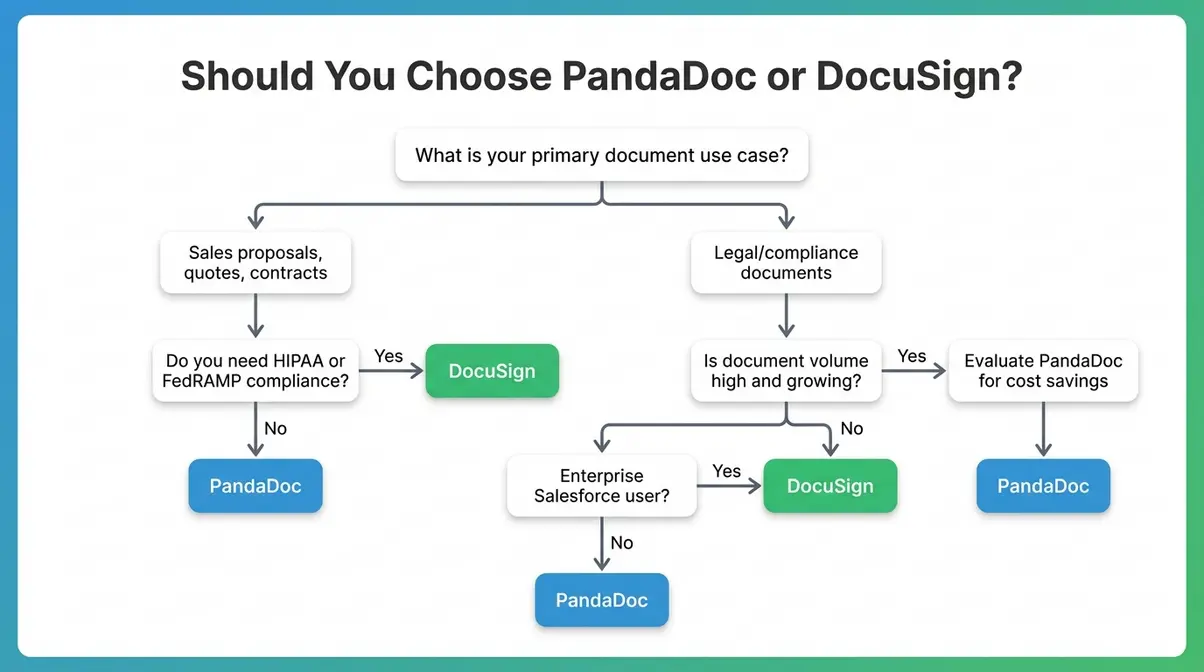
For most business professionals evaluating these two tools in 2026, the decision framework is simpler than the feature lists suggest. PandaDoc is the right tool for teams whose primary job is selling and closing deals. DocuSign is the right tool for organisations where legal compliance and enterprise auditability are the primary requirements.
The Envelope Tax is the deciding factor for growth-stage businesses. If you’re sending 100+ documents per month and that volume is growing, DocuSign’s per-envelope model will cost you more every month as you succeed. PandaDoc’s flat-rate model scales with you without penalising your growth. At 500 documents per month for a 5-person team, the annual cost difference reaches $1,860 or more — real money that compounds year over year.
Choose PandaDoc If…
- Your team sends 20+ proposals, quotes, or contracts per month and volume is growing
- You need end-to-end document workflows — creation, personalisation, e-signature, and payment in one tool
- You’re on HubSpot, Pipedrive, or Zoho and want deep CRM integration without custom development
- Budget predictability matters — you want a flat monthly cost regardless of document volume
- Your primary goal is shortening sales cycles, not satisfying a compliance audit
- You’re a founder or sales manager who builds and sends documents personally
Choose DocuSign If…
- Your industry requires HIPAA, FedRAMP, or Qualified Electronic Signature (QES) compliance
- You’re a large enterprise with an existing Salesforce deployment and DocuSign for Salesforce is already in the tech stack
- Your legal team controls the purchasing decision and needs court-admissible audit trails
- You operate across multiple EU jurisdictions where QES-level signatures are legally required
- You’re in real estate, healthcare, financial services, or government contracting
- Document volume is low and predictable — the envelope model won’t cost you more than a flat-rate alternative
Frequently Asked Questions
Is PandaDoc as good as DocuSign?
PandaDoc is better than DocuSign for sales workflows — it offers superior document creation, analytics, and CRM integration. DocuSign is better for enterprise compliance. “Better” depends entirely on your primary use case: if you’re building proposals and closing deals, PandaDoc wins. If you need HIPAA or FedRAMP compliance, DocuSign wins. For most SMB and mid-market sales teams, PandaDoc is the more practical and cost-effective choice.
Is PandaDoc a Chinese company?
PandaDoc is not a Chinese company. It is a US company headquartered in San Francisco, California, founded in 2013. Its founders are originally from Belarus, and the company is incorporated and operates under US law. It processes data on AWS infrastructure and holds SOC 2 Type II certification. There is no Chinese ownership or data jurisdiction concern.
Is there a better option than DocuSign?
For sales teams, PandaDoc is a better option than DocuSign. For Adobe ecosystem users, Adobe Acrobat Sign offers comparable compliance at a lower price point. For in-house legal teams, Juro provides better contract collaboration. For basic e-signatures at minimal cost, Dropbox Sign is sufficient. DocuSign remains the best option specifically for regulated industries requiring FedRAMP or QES-level compliance.
Does PandaDoc integrate with DocuSign?
PandaDoc does not natively integrate with DocuSign — they are competing platforms solving similar problems. PandaDoc integrates with HubSpot, Salesforce, Pipedrive, Zoho, Slack, and 30+ other tools. DocuSign integrates with Salesforce, Microsoft 365, Google Workspace, and SAP. You would not typically use both tools simultaneously; the choice is one or the other.
Who is DocuSign’s biggest competitor?
Adobe Acrobat Sign is DocuSign’s largest direct competitor by market share in the enterprise e-signature segment. In the SMB and sales-workflow segment, PandaDoc is the most relevant competitor. HelloSign (Dropbox Sign) competes at the lower end of the market. DocuSign still holds approximately 70% of the e-signature market (Statista, 2025), but its share has been declining as competitors close the compliance gap.
Is PandaDoc trustworthy?
Yes, PandaDoc is trustworthy for business document workflows. It holds SOC 2 Type II certification, is GDPR compliant, and is backed by over $100 million in venture funding including from Microsoft’s M12 fund. Its e-signatures are legally binding under the ESIGN Act and standard eIDAS tiers. The “trustworthy?” question often arises from brand unfamiliarity — PandaDoc is simply less well-known than DocuSign outside of sales circles.
What country is DocuSign from?
DocuSign is a US company, headquartered in San Francisco, California. It was founded in 2003 and listed on NASDAQ (ticker: DOCU) in 2018. It operates globally across 180+ countries and holds FedRAMP Moderate authorisation for US federal government use.
Why is DocuSign falling?
DocuSign’s share price has faced pressure from increased competition and post-pandemic normalisation of e-signature demand after the 2020–2021 growth spike. The company has also faced criticism for its per-envelope pricing model as competitors like PandaDoc and Adobe Acrobat Sign offer flat-rate alternatives. DocuSign reported slowing net revenue retention as mid-market customers migrate to lower-cost alternatives — a trend that The Envelope Tax dynamic directly explains. Its enterprise and regulated-industry segments remain strong.
