 By Dave King
Somewhere around the third message in a week, I realised something had shifted. Other agency owners weren’t just asking me how GoHighLevel worked — they were asking me to set it up for them. That wasn’t the plan when I started using it, but here we are.
The reason they’re asking is straightforward: GoHighLevel is genuinely powerful, and the learning curve is genuinely brutal if you go at it without a system. Most people either give up after two weeks of clicking around, or they get so deep into configuring features they’ll never use that they lose sight of why they signed up.
In this post, I’ll show you exactly how to use GoHighLevel across your businesses by sharing what I actually run on mine — where people consistently go wrong, and when it makes sense to get outside help rather than burn another weekend on it yourself. We’ll cover the core features I rely on, the business case in real numbers, the failure points I see most often, and a straight answer on the DIY-vs-help question.
“The main benefit of GoHighLevel is that you can completely streamline all of your operations in one place so that your business can run more efficiently.”
That’s the pitch. The reality is close to that — but only if you know where to start.
What’s in this guide
What I Actually Use GoHighLevel For
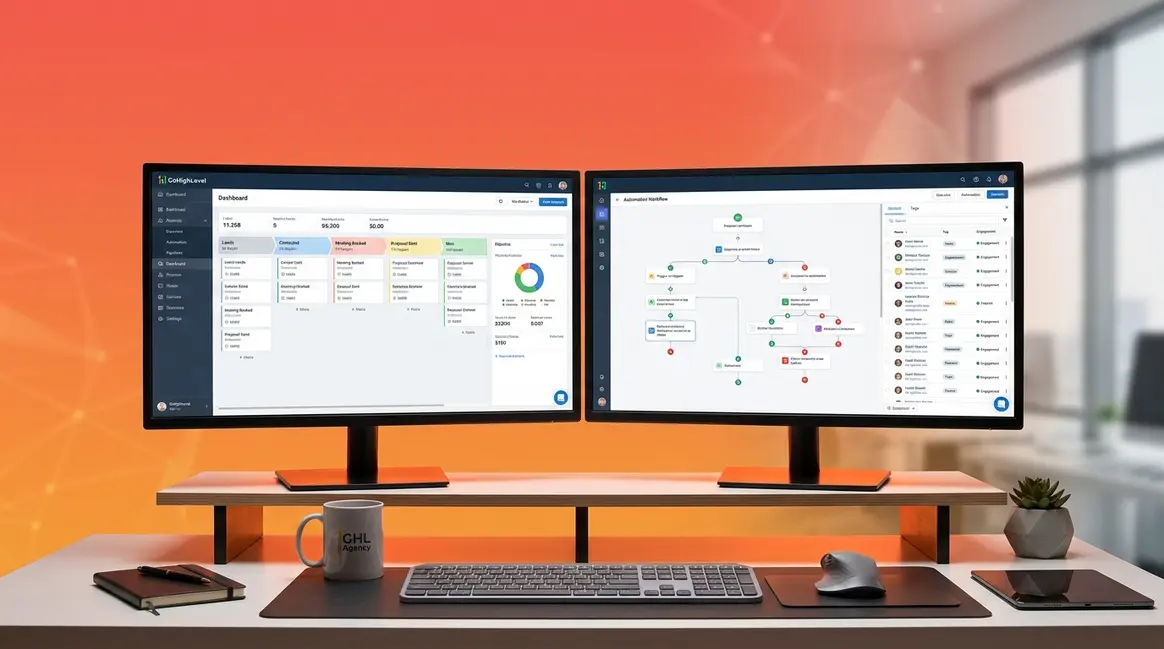
GoHighLevel consolidates CRM, email, SMS, calendars, funnels, and course hosting into a single dashboard — a structure that mirrors how an agency actually operates. I run it across three businesses, including my agency work at Carden Digital, and how I use GoHighLevel day-to-day looks nothing like the generic tutorial walkthroughs you’ll find elsewhere. For anyone evaluating the platform, the honest starting point isn’t “what can it do?” — it’s “what are you actually going to switch on first?”
The rapidly expanding CRM software market — Statista reported the global CRM software market was valued at over $80 billion in 2026 — reflects how central this category has become for agencies consolidating tools. GoHighLevel sits squarely in that consolidation trend, but the way it’s structured is what most guides fail to explain clearly.
What GHL Actually Runs in My Businesses
Before I started using GoHighLevel, I was paying separately for ActiveCampaign (email automations), Calendly (booking), a standalone funnel builder, and a separate CRM. That’s four subscriptions doing jobs that GHL handles under one roof. At Carden Digital, we moved the client management side onto GHL about two years ago — and the operational difference was immediate.
The key architectural thing to understand is the Agency View vs. Sub-account split. The Agency View is your master dashboard — your own business settings, billing, and the ability to create and manage client workspaces beneath it. A sub-account is essentially a client workspace: think of it as a self-contained copy of GHL configured for one specific business or client. Your own business can also live in a sub-account beneath your Agency View. Most tutorials skip this distinction entirely, which is why so many people set themselves up wrong from day one.
This is also where “The All-In-One Trap” starts. GHL is best approached one module at a time — not all at once. When I first set up GHL for the lead generation side of Carden Digital, the first thing I turned on was the CRM and one automation (the missed-call text-back). Nothing else. Six weeks later, we had a clean contact database, zero missed after-hours enquiries, and a clear picture of where leads were dropping off. That’s the approach. Not “configure everything in week one.”
If you want the deeper platform breakdown before reading further, I’ve covered the full feature set in my full GoHighLevel review.
The table below shows exactly how I use each core feature — and what I skip.
How I Use GoHighLevel Features
Here’s how I use GoHighLevel’s core features mapped against what each one actually does. GoHighLevel’s official feature overview confirms the platform covers CRM, automation, funnels, and course hosting in a single dashboard (2026) — but knowing what to prioritise is a different conversation.
| Feature | What It Does | How I Use It |
|---|---|---|
| CRM & Contacts | Stores and segments all leads and clients | Central contact database across all businesses — tagged by source and status |
| Sales Pipelines | Visual drag-and-drop deal tracking | Tracks client onboarding stages and monitors where deals stall |
| Unified Inbox | All SMS, email, and social DMs in one place | Ensures no lead enquiry gets missed across channels |
| Calendar & Booking | Self-serve appointment scheduling | Replaced Calendly entirely — used for all discovery calls and client meetings |
| Workflow Automation | Trigger-based automation sequences | Missed-call text-back, appointment reminders, post-service follow-ups |
| Funnels & Websites | Drag-and-drop landing page builder | Lead gen pages for client campaigns at Carden Digital |
| Conversation AI | 24/7 AI-powered lead response | After-hours lead capture — responds to inbound enquiries while I’m offline |
| Memberships/Courses | Host digital products and training | Hosts training resources for clients onboarding onto our systems |
| SaaS Mode | White-label GHL for clients | Used to bill clients for GHL access under our own branding |
| Reputation Management | Automate review requests | Post-service review sequences triggered automatically after job completion |
That’s the what. Here’s why it actually matters for the bottom line.
What GoHighLevel Actually Changes
When figuring out how to use GoHighLevel, the change you notice first isn’t the cost saving — it’s the silence. The follow-up sequences run. The appointments book themselves. The leads that used to fall through after hours get a text back within 90 seconds. At Carden Digital, we went from missing roughly 30% of after-hours enquiries to capturing all of them with a single missed-call text-back automation. One workflow. That was the moment it clicked.
Gartner research on CRM implementation failure rates indicates up to 63% of CRM initiatives fail to meet expectations — the most common reason is poor user adoption driven by trying to configure too many features at once. That’s “The All-In-One Trap” playing out in enterprise CRM, and it plays out exactly the same way in GHL. The counter-evidence, from our experience, is that starting with one workflow changes everything about the adoption curve.
Benefits in Practice
Here’s how GHL maps to real business problems I was actually dealing with before the switch:
| Business Problem | GoHighLevel Solution | Result |
|---|---|---|
| Leads falling through after hours | Conversation AI + Missed-Call Text-Back | 100% after-hours lead capture — zero missed enquiries |
| Contacts scattered across spreadsheets | Centralised CRM with tags and pipelines | Single source of truth for all leads across businesses |
| Back-and-forth appointment booking | Built-in calendar with automated confirmations | Eliminated scheduling back-and-forth entirely |
| Paying for 6+ separate tools | Single GHL subscription | Consolidated four paid tools into one subscription |
| Inconsistent follow-up sequences | Workflow automation | Follow-up now runs to a consistent sequence every time |
| Manual review requests | Reputation management automation | Review requests triggered automatically — review volume increased within 30 days |
One honest caveat worth flagging here: GHL’s email builder and reporting dashboards aren’t as polished as dedicated standalone tools. If deep analytics or pixel-perfect email design are your primary need, you’ll feel the gap. For most GoHighLevel agency use cases, though, the trade-off is worth it.
So it works — when you use it right. The problem is most people don’t, and the reasons are pretty consistent.
The Real Problems People Hit With GoHighLevel
The problems are real — I’m not going to dress them up as minor inconveniences. The core issue, almost every time, comes back to “The All-In-One Trap”: people learning how to use GoHighLevel try to configure the CRM, automations, funnels, and integrations simultaneously in week one, and the whole thing grinds to a halt. I’ve written separate guides on each of the specific failure points below — here’s where to go for whichever problem you’re currently stuck on.
The Most Common GHL Failure Points
These are the five failure modes I see most consistently, whether someone is setting GoHighLevel up for clients or for their own business:
- Twilio/LC Phone and email integration setup. This is the most common early blocker by some distance. Twilio’s A2P 10DLC compliance requirements — Twilio’s official documentation details the A2P 10DLC registration requirements for automated SMS, which trips up new GoHighLevel users who didn’t expect a compliance step before they can send a single text. The good news: GoHighLevel’s native LC Phone and LC Email have significantly simplified this compared to the old manual Twilio/Mailgun setup. If you’re starting fresh in 2026, use LC Phone and LC Email first. Only switch to Twilio/Mailgun if you have a specific reason to.
- Building workflows before the CRM data is clean. Automations fire based on what’s in your contact records. If your contact list is a mess of duplicates, missing tags, and incorrect pipeline stages, your beautifully built workflow will fire to the wrong people at the wrong time. Clean the CRM first. Always.
- The Agency/Sub-account confusion. A surprisingly large number of people set up their own business as a sub-account without understanding what the Agency View is for — then spend hours wondering why they can’t find their billing settings. Your agency settings live in the Agency View. Your business operations (and each client’s) live in sub-accounts beneath it.
- Snapshot overload. GoHighLevel’s snapshot feature lets you import a pre-built account configuration — which sounds like a shortcut until you import one without understanding what’s inside it. You end up with automations firing, pipelines you didn’t build, and settings you don’t recognise. Load a snapshot only once you understand what it contains.
- Underestimating contact list cleanup time. I initially assumed the workflow builder was the hardest part. It’s not — it’s actually the most intuitive once you understand the trigger logic. What I underestimated was how long it takes to clean up an imported contact list. If you’re migrating from another CRM, budget twice as long as you think you need for data hygiene.
Here are the specific guides for each of these problems — I’ll update these links as each cluster post goes live:
- Setting up Twilio with GoHighLevel (coming soon)
- Building your first GoHighLevel workflow (coming soon)
- Organising your GoHighLevel CRM (coming soon)
- Creating funnels in GoHighLevel (coming soon)
- GoHighLevel SaaS Mode and white-labelling (coming soon)
****
Most of these are fixable with the right setup sequence — or with someone who’s already made the mistakes for you.
When It’s Worth Getting a GoHighLevel Consultant
There are two types of GHL users I see regularly. The first type is perfectly capable of setting this up themselves — they just need a clear sequence and a bit of patience. The second type is losing real time and money every additional week they spend figuring it out on their own, usually because they’re under a live client deadline or migrating an existing contact base that can’t afford errors.
Knowing which type you are is the actual question.
DIY vs. Getting Help: Honest Criteria
DIY is the right call if:
- You have a few weeks of runway to learn without a live client depending on the output
- You’re setting GHL up for one business, not multiple clients simultaneously
- You enjoy the technical side and don’t mind iterating through the setup process
- You’re starting from scratch — no legacy CRM data to migrate
Get help if:
- You’re migrating an existing client base and data errors have real consequences
- You’re working to a live client deadline and can’t absorb a two-week learning curve
- You’ve already spent more than 10-15 hours stuck on the same setup problem (this is the tell)
- You want SaaS Mode configured correctly from day one — the white-label setup has specific sequencing that’s easy to get wrong
What I actually help with as a GoHighLevel consultant — and this is worth being specific about, because it’s not hand-holding or ongoing management — is project-based setup work: initial account architecture, workflow builds, LC Phone and LC Email configuration, snapshot creation, and SaaS Mode setup for agencies wanting to bill clients for GHL access.
On that last point: for agencies managing more than three client accounts in GoHighLevel, the SaaS Mode white-label setup typically pays for the platform subscription within the first month of billing clients. That’s the “how to use GoHighLevel to make money” angle that most guides skip entirely. If you’re running a GoHighLevel agency and you’re not using SaaS Mode, you’re leaving straightforward recurring revenue on the table.
For the Stripe’s payment integration guidelines side of SaaS Mode — Stripe’s official documentation outlines the API protocols required to process client subscriptions within SaaS platforms — the configuration is more involved than it looks, which is one of the specific areas where outside help tends to pay for itself quickly.
If you’re just getting started, the single account trial is the right entry point — no commitment, and you’ll know within two weeks whether GHL fits your workflow: start your GoHighLevel trial here.
Running an agency already? The agency/pro plan is built for multi-client management and includes the SaaS Mode functionality: the agency/pro plan is worth looking at.
If you’d rather skip the setup headaches entirely and get the architecture right from the start, contact Dave here.
And if you want a visual walkthrough of the workflow setup process before you decide:
Frequently Asked Questions About GoHighLevel
Is GoHighLevel easy to learn?
GoHighLevel has a genuine learning curve — it’s not a tool you’ll master in an afternoon. That said, it becomes approachable quickly if you start with one module rather than everything at once. Most users get comfortable with the CRM and basic automations within a few days of consistent use. The difficulty spikes when you hit the communications setup — LC Phone and LC Email in 2026 are simpler than the old Twilio/Mailgun process, but they still require a registration step that catches people off guard.
What do people use GoHighLevel for?
GoHighLevel is an all-in-one platform used to replace multiple separate business tools. Agencies and business owners use it for CRM, sales pipeline management, automated email and SMS follow-up, appointment booking, landing page and funnel building, and hosting digital products. Its primary appeal is consolidating eight or more tools into a single subscription, which reduces costs and removes the friction of switching between platforms constantly throughout the working day.
What are GoHighLevel’s disadvantages?
The main disadvantages of GoHighLevel are its steep learning curve and feature sprawl. Because it tries to do everything, some individual modules — particularly the email builder and reporting dashboards — aren’t as polished as dedicated standalone tools. The initial communications setup remains a meaningful early blocker for many users. It’s also not the right fit if you only need one or two of its features — at that point, a purpose-built tool is likely cheaper and simpler.
Is GoHighLevel hard to set up?
The initial setup is manageable if you follow GoHighLevel’s Launchpad checklist rather than trying to configure everything at once. The trickiest part for most users is connecting the phone and email systems — GoHighLevel’s native LC Phone and LC Email have simplified this significantly compared to the older Twilio/Mailgun manual configuration. Budget a few hours for the core setup, and a few days before you feel genuinely comfortable navigating the platform without second-guessing yourself.
How long to learn GoHighLevel?
Basic functions — CRM, contact management, and appointment booking — are learnable within a day or two of focused use. Building and testing your first automation workflow typically takes a week of consistent work. Mastering advanced features like SaaS Mode, complex multi-step workflows, and the full funnel builder can take several weeks. The timeline depends heavily on your technical background and how many of GHL’s features your specific business actually needs — most people use far fewer than they initially plan to.
Start With One Thing, Not Everything
For agency owners, GoHighLevel delivers real operational leverage — but only when you resist the urge to configure everything at once. At Carden Digital, the shift from missing 30% of after-hours enquiries to capturing all of them came from a single workflow, not a full platform overhaul. That’s the core lesson here: “The All-In-One Trap” isn’t about the software being bad — it’s about the instinct to use all of it before you understand any of it.
“The All-In-One Trap” is why other agency owners started messaging me. They’d signed up, been overwhelmed by the scope, and either stalled or misconfigured something fundamental. The trap is avoidable — but only if you know it’s there. Start with your CRM and one automation. Get that running cleanly. Then layer in the next thing.
If you are still wondering how to use GoHighLevel for your own agency, there are two paths from here. If you’re evaluating whether GoHighLevel is right for your business, start your GoHighLevel trial here and give it two focused weeks before deciding. If you’re already running an agency and want the setup done properly from day one, the agency/pro plan is worth looking at — or get in touch directly if you’d rather skip the learning curve entirely. Want the full breakdown before you decide? Read my complete GoHighLevel review.